
Your Scraper Stores Block Pages as Data. Here’s How to Stop.
Gyrence’s Fetch primitive starts cheap, escalates to a headless browser only when a page needs one, and returns a named error instead of passing off a block page as content.
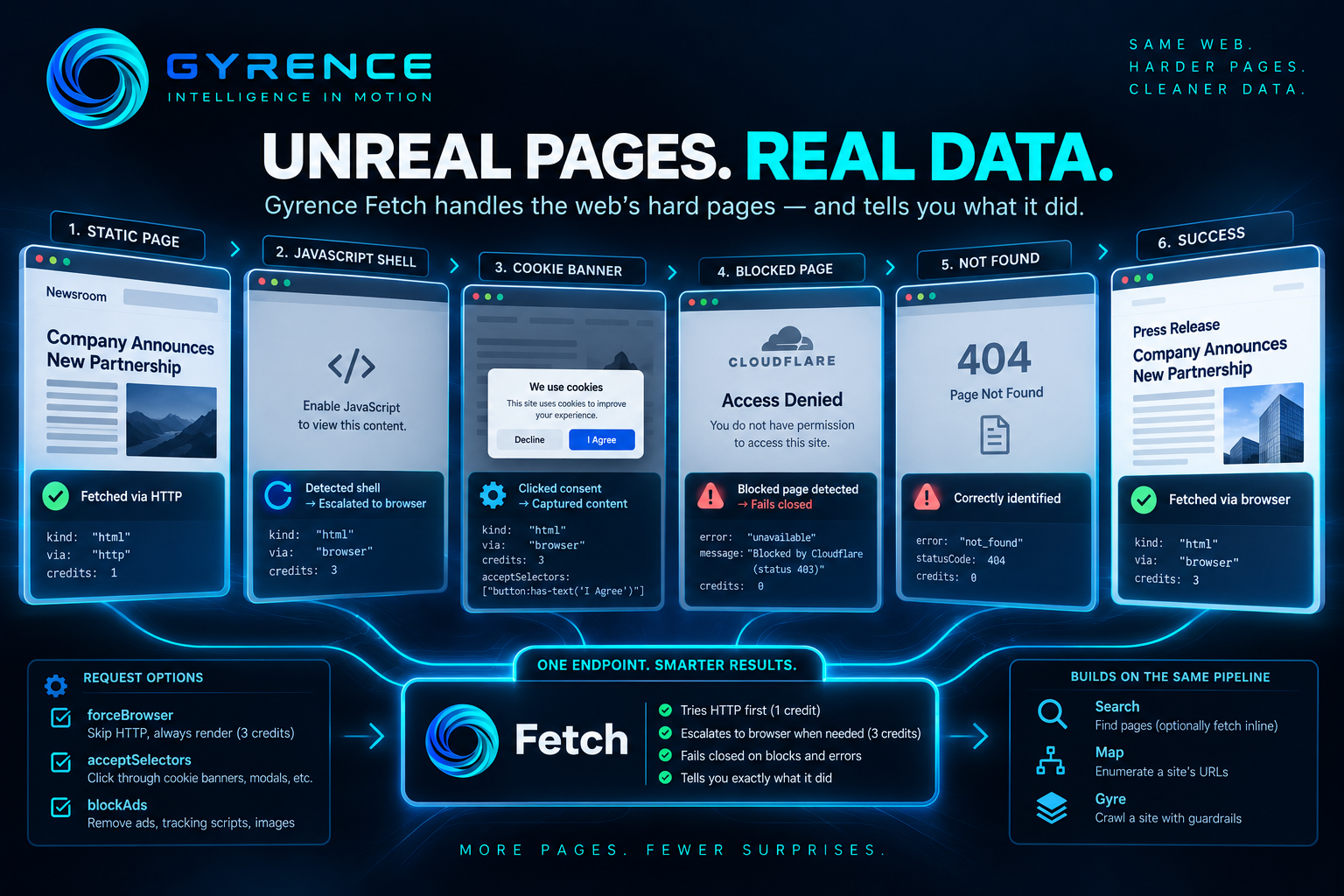
Most scraping projects start the same way: a script that fetches a URL, parses the HTML, and works beautifully on the first three pages. Then the fourth page is a JavaScript shell with an empty body, the fifth sits behind a cookie banner, and the sixth quietly returns a "your request has been blocked" page with a perfectly healthy status code. Your pipeline stores that block page as if it were data.
The hard part of data acquisition is rarely the first request. It is the long tail of pages that don't behave like the first request, and knowing — reliably — which result you can trust. This post walks through how Gyrence's Fetch primitive handles that tail, using only behavior documented in the product's API reference.
The scenario: one list of URLs, many kinds of pages
You're building a research agent that tracks public announcements from a few dozen organizations. Your URL list is a mix: static pages, single-page applications that render in the browser, sites with consent banners, and the occasional site with bot protection. Writing one scraper per site is not an option. You want one call that does the right thing and tells you what it did.
curl -X POST https://www.gyrence.com/api/v1/fetch \
  -H "Authorization: Bearer $GYRENCE_API_KEY" \
  -H "Content-Type: application/json" \
  -d '{"url":"https://example.com/announcements"}'
Start cheap, escalate only when needed
Fetch is a two-tier system. It tries a plain HyperText Transfer Protocol (HTTP) request first, which costs 1 credit. It escalates to a headless browser worker (3 credits) only when the cheap attempt shows signs of failure. The documented triggers are:
- the origin answers with a 403, 429 or 503 status, or the network request fails;
- the response body is under 500 characters;
- the body contains a marker of a JavaScript-only shell, such as an empty
id="root"container or a "You need to enable JavaScript" message; - the HTML was at least 1,000 characters but converted to fewer than 100 characters of markdown, meaning the real content was missing.
That last trigger matters more than it looks. Plenty of scrapers only notice a JavaScript shell when the page is tiny. Gyrence also catches the case where the page is large but the useful content never made it through conversion.
Every response carries a via field, either "http" or "browser", so you can attribute cost per URL. Errors are not charged. If your list is 90 percent static pages, you pay roughly the HTTP rate for 90 percent of it, without having to know in advance which pages those are. Gyrence also tracks domain health: hosts that are known to need a browser skip the doomed HTTP attempt entirely.
Knobs for the stubborn pages
When you already know a page needs a browser, or needs help once it gets one, Fetch exposes a few request parameters:
forceBrowserskips the HTTP tier and always renders in the browser (3 credits).acceptSelectorstakes a list of Cascading Style Sheets (CSS) selectors to click before the page is captured, for example a consent button such asbutton:has-text("I Agree"). This is how you get past cookie banners and terms-of-use modals that would otherwise cover the content.blockAdstells the browser worker to block ad networks, tracking scripts, images, fonts and stylesheets before capture, which cuts transfer on ad-heavy pages.
Both browser-only flags are no-ops on the HTTP tier, so they are safe to send on every request.
Failing loudly instead of storing garbage
The most useful property of a data acquisition layer is what it refuses to give you.
- Block pages fail closed. If the first 4 kilobytes of a response show markers from Akamai, Cloudflare, PerimeterX or DataDome, or a generic "access denied" page, Fetch returns the error code
unavailablewith a message likeBlocked by Akamai (status 403). You do not receive the block page as markdown. - Missing pages are typed. An origin 404 becomes a
not_founderror rather than a success response containing a "page not found" article. Origin 5xx errors becomeupstream_error. - Deadlines are explicit. Requests exceeding the 25-second hard deadline return
timeout. - Unsupported content is refused. Binary content Gyrence can't parse returns
kind: "unsupported"with a reason, never a populated-but-wrong text field.
For a pipeline, this turns a vague question ("is this text real content?") into a branch on a documented error code. Retry on timeout, log and skip on not_found, alert a human on unavailable.
The documentation is candid about limits: links injected by JavaScript after capture won't appear in links, and a small set of heavily defended origins get past the stealth configuration.
Going from one URL to many
Once single pages behave, you widen the net with the other primitives: Search finds pages, and can fetch each result inline with a single call (fetch: true), reporting the tier used for each; Map enumerates a site's URLs; and Gyre walks a site within a page budget, capped at 100 pages per call with a per-host limit of 3 concurrent connections so you stay a polite guest. Every one of them reuses the same fetch pipeline, so the escalation and fail-closed behavior carry over.
The takeaway
Record via, statusCode and kind with every result, branch on the error code, and add acceptSelectors once for banner-gated sites.
The result isn't magic. It's a pipeline where the cheap path is the default, the expensive path is automatic when justified, and failures are named rather than disguised as data. For anyone evaluating web-data infrastructure, that last property is the one to test first: feed it your ugliest ten URLs and see whether it hands you honest errors.