
Map First, Fetch Second: Acquiring Only the Pages You Actually Need
Gyrence's Map primitive lists a site's URLs from its sitemaps (or its links when there is no sitemap) so you can pick targets before spending a single fetch, and Extract turns each chosen page into JSON and tells you when it only read part of it.
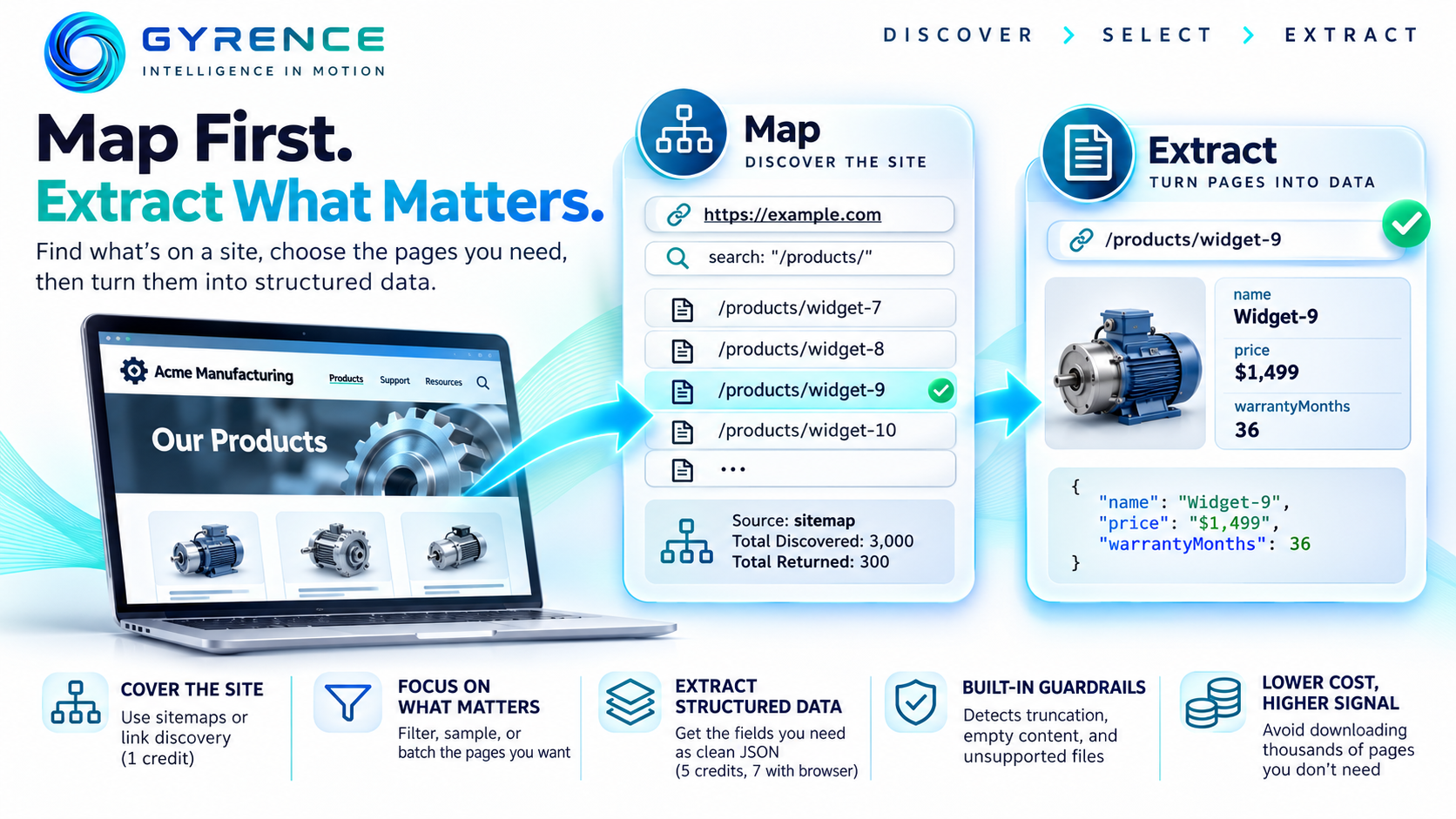
The usual way to collect data from a website is to point a crawler at the home page and let it run. It works, but it is wasteful. You pay to download pages you will throw away, and you find out what the site contains only after the crawl is over.
A better order is to ask what exists first, choose what you want, and only then download it. In Gyrence, that is two primitives working together: Map and Extract.
The problem: crawling blind
Say you track product specifications across a manufacturer's website. The site has thousands of pages: blog posts, careers, legal notices, support articles, and a few hundred product pages. A blind crawl visits all of them. Most of what it collects is noise, and every page costs time and money.
What you really want is a list of the product page addresses, up front, so you can decide how much to fetch.
Step one: Map the site
Gyrence's Map primitive enumerates the addresses on a site. It is deliberately cheap: the README lists Map at 1 credit per call, whatever the site size.
You send a starting address, and optionally three parameters:
limit: how many addresses to return, from 1 to 5,000 (the default is 5,000).includeSubdomains: whether to include hosts such asdocs.example.comalongsideexample.com(off by default).search: a simple text filter. Only addresses containing your text are returned, sosearch: "/products/"narrows a huge site to the section you care about.
Under the hood, Map prefers the site's own sitemaps. It reads robots.txt for declared sitemap locations, also tries the common paths sitemap.xml, sitemap_index.xml and wp-sitemap.xml, and follows sitemap indexes (sitemaps that point to other sitemaps) up to three levels deep. It caps the work at 40 sitemap files per request, so one oversized site cannot stall a call.
Not every site publishes a sitemap. When none is found, Map falls back to reading the links on the home page. If a page is a JavaScript shell whose links only appear after the browser renders it, Map escalates to Gyrence's headless browser worker to collect them. For sparse results it takes one further hop outward, fetching a small batch of discovered pages in parallel to harvest more links.
Two details make the output easier to trust:
- It follows redirects. Many documentation sites silently redirect to another domain. Map resolves the redirect first so that it filters on the real host instead of returning zero results.
- It tells you where the list came from. The response carries
source, eithersitemapordiscovered, plustotalDiscoveredandtotalReturned. If you asked for 200 addresses and the site has 4,000 matching ones, you can see that, rather than assuming the 200 were everything.
Map also refuses to fetch anything that is not a public address, so a hostile robots.txt cannot point it at internal systems.
Step two: choose your targets
Because Map returns a plain list, selection is ordinary code. Filter it, sample it, or split it into batches. You might keep addresses matching a pattern, drop ones you already hold, and process fifty at a time. None of that costs fetches.
Step three: Extract structured fields
For each chosen page, Extract takes the address, a plain-language prompt (what you want), and an optional schema, a JSON shape you want back. For example:
{
  "url": "https://example.com/products/widget-9",
  "prompt": "Pull out the product name, price and warranty length",
  "schema": "{\"name\":\"string\",\"price\":\"string\",\"warrantyMonths\":\"number\"}"
}
Extract first fetches the page through the same two-tier pipeline as Fetch: a quick HTTP request, escalating to a headless browser only when the page needs one. It then asks a language model to fill in your shape and returns strict JSON. If you leave out the schema, it returns a flat object with the most relevant fields it can infer. Extract is priced at 5 credits per call, or 7 when the browser is needed.
The detail worth knowing is how it handles limits. Long pages are cut to the first 12,000 characters before the model sees them, and the response says so: truncated is true and originalLengthChars reports the full size. If a field you needed sat near the bottom of a very long page, you can detect that instead of wondering why a value came back empty. A page that yields no text fails with empty_content, and a file type that cannot be read, such as an unsupported binary, fails with unsupported_binary and a reason. Neither returns a convincing but empty record.
Extract also accepts audio and video addresses, such as YouTube links or podcast feeds, and works from the transcript. If no transcript can be produced, it says so instead of quietly extracting from the surrounding web page.
Why the order matters
Compare the two approaches on cost. Blind crawling pays per page for everything it touches. Map-first pays 1 credit to see the whole site, then pays only for the pages you keep. If a site has 3,000 pages and 300 are products, you have avoided roughly 2,700 downloads, and you know the exact size of the job before starting it.
It also makes the pipeline easier to reason about. The list of targets is a visible, reviewable object. You can log it, diff it against last week's list to spot new pages, and rerun only the failures.
Where this fits, and where it does not
Map is best on sites that publish decent sitemaps. On sites without them, the link-based fallback only goes a hop or two deep, so very deep sections may be missed. Treat totalDiscovered as a prompt to check coverage, not a promise of completeness. And Gyrence is open about one more limit: a small number of heavily defended sites can still block the browser tier.
Try it
- Call Map on a site you care about with a
searchfilter for the section you want. - Check
sourceandtotalDiscoveredto see how the list was built. - Run Extract on three or four of the returned addresses with a small schema and compare the output with the pages themselves.
If the results look right, you have a pipeline that spends money only on pages you chose. Both primitives are also available as tools through Gyrence's Model Context Protocol server, so an agent can run the same map-then-extract loop itself.