
Don't Monitor One Page. Monitor the Whole Notices Section.
WebDoppler can discover every notice and PDF under a hub page, register them in one request, and tell you honestly when a check can't be trusted.
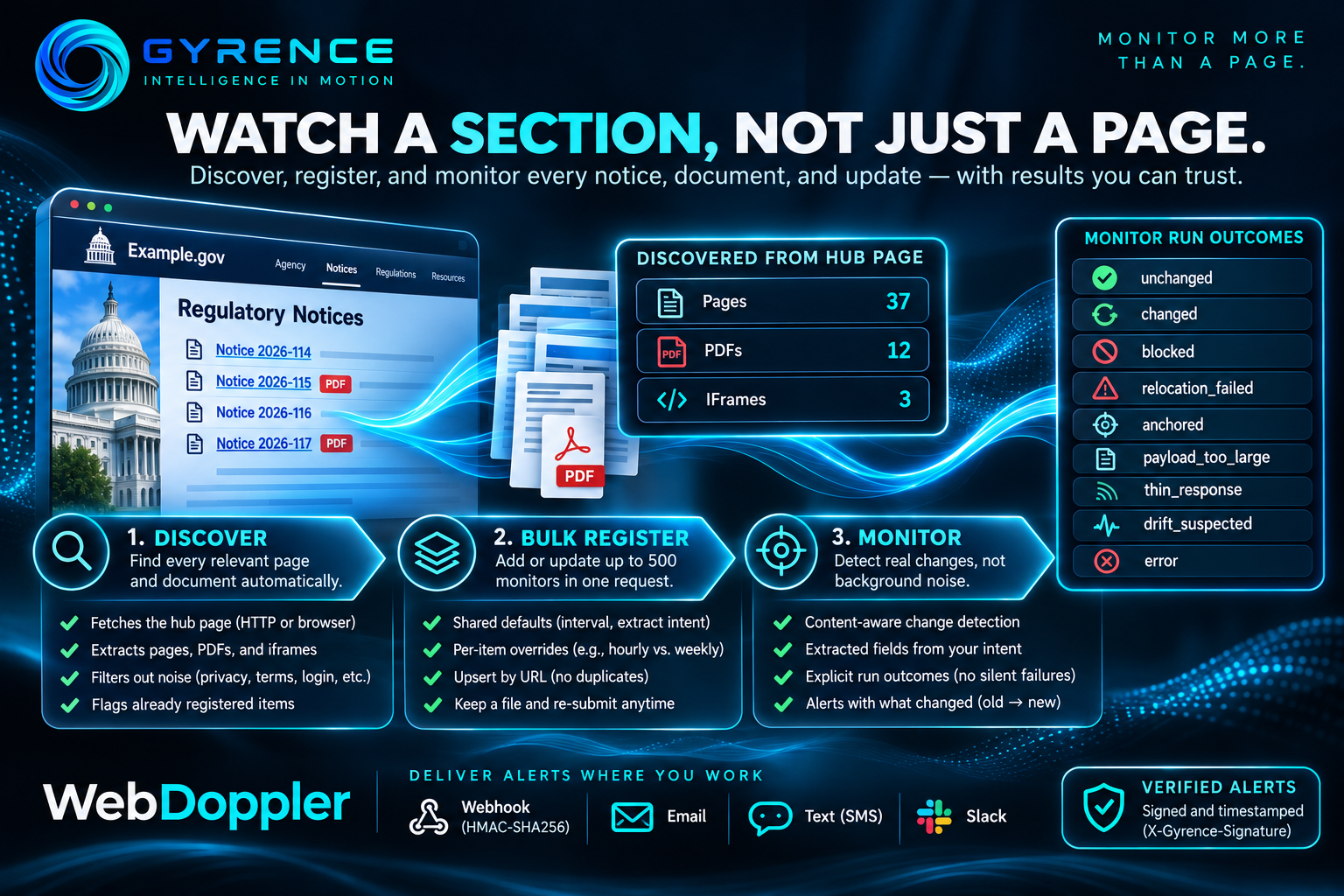
Most change-monitoring tutorials start with a single URL. Real work does not. If you track a regulator, a port authority, or a city planning office, the thing you care about is not one page. It is a section of a website that holds dozens of notice pages and linked PDF documents, and new ones appear without warning. The hard part is not detecting a change on a page you already know about. It is making sure you are watching every page that matters, and trusting that silence means "nothing changed" rather than "something broke."
This post walks through how WebDoppler, Gyrence's change-monitoring capability, handles that onboarding problem, using only what is in the product today.
Step one: ask a hub page what it links to
Suppose a regulator publishes a "Notices" index page that links to individual notices and attached PDF files. Instead of copying links by hand, you send that index URL to the monitor discovery endpoint (POST /api/v1/monitor/discover).
Gyrence fetches the page, using its normal two-tier approach: a plain web request first, with a headless browser only when the page needs one. It then sorts what it finds into three lists: pdfs, pages, and iframes (pages embedded inside the hub page, which many older government sites rely on). Only links on the same host are kept as pages, and the endpoint drops the usual clutter: privacy and terms pages, login and cart paths, careers, contact, and static assets such as stylesheets and icons. The response includes counts, and each URL is tagged already_registered so you can see what your workspace is already watching.
Because of that flag, a re-run next quarter doubles as a coverage check.
Step two: register everything in one request
Next, you take the URLs you want and send them to the bulk registration endpoint (POST /api/v1/monitor/register/bulk), which accepts between 1 and 500 items. A defaults block applies shared settings to every item, and any item can override them:
{
  "defaults": {
    "check_interval_hours": 24,
    "extract_intent": "Notice title, effective date, and the agency that issued it"
  },
  "items": [
    { "url": "https://example.gov/notices/2026-114", "label": "Notice 2026-114" },
    { "url": "https://example.gov/notices/2026-115.pdf", "check_interval_hours": 6 }
  ]
}
Two details make this safe to automate. First, the check interval is configurable from 1 to 168 hours, so a fast-moving docket can be checked hourly while a quarterly page is checked weekly. Second, registration is an upsert keyed on your workspace and URL. The code comment is explicit that re-uploading a spreadsheet will not create duplicates and does not touch the stored baseline of pages you already watch. You can keep your monitor list in a file, re-submit it whenever it changes, and each result tells you whether the entry was created or updated.
The extract_intent field is where monitoring becomes useful to a downstream system. You describe in plain language which fields you care about, and the alert carries those extracted fields rather than just "something changed."
Step three: know what silence means
A monitor that never alerts is ambiguous. Either nothing changed, or the monitor has been staring at an error page for a week. WebDoppler records an explicit outcome for every run, and the list is deliberately specific: unchanged, changed, blocked, relocation_failed, anchored, payload_too_large, thin_response, drift_suspected, and error.
The blocked outcome is a good example of the design. Blocked detection checks the response status first, but it also scans the start of the response body for challenge-page phrases such as "just a moment" and "please verify you are a human." The source comments explain why: some bot-protection pages return a normal success status with challenge HTML inside, so checking the status alone would store the challenge page as a healthy snapshot and report a false "all clear." Gyrence records the run as blocked instead.
A redesign gets the same treatment: drift_suspected and relocation_failed say the monitor lost confidence in where your data lives, instead of reporting nothing.
Step four: get the alert somewhere useful
When something does change, the alert payload includes the monitor identifier, the URL, the detection time, the outcome, a field-level change_signal (each entry has the field name, the old value, and the new value), any newly found PDF links, and the extracted_fields from your intent. Delivery options include a webhook, email, text message, and Slack. Webhook deliveries are signed: Gyrence computes an HMAC (a keyed hash that proves the message came from the sender and was not altered) over the JSON body using the SHA-256 hashing algorithm and sends it in an X-Gyrence-Signature header, alongside an X-Gyrence-Timestamp header. Your receiving service recomputes the signature and rejects anything that does not match.
For an agent builder, that closes the loop: no polling, just a small, verified message saying which field moved from what to what.
What to know before you try it
WebDoppler is a separately gated capability. Holding a Gyrence API key does not automatically grant access; workspaces are entitled individually, and a workspace without entitlement receives a structured 403 forbidden response from the registration endpoints rather than a silent failure.
The takeaway
Single-page monitoring is a demo. Section-level monitoring is the actual job, and it needs three things: a way to enumerate what exists, a way to register it repeatably, and honest outcomes when a check cannot be trusted. Discover, bulk register, and explicit run outcomes give you those three, so that when your dashboard is quiet, it is quiet because the world is.