
Did the CEO Say What the Filing Says?
Checking one number across an earnings call, a regulatory filing and a press release fails long before the comparison, and Gyrence’s Fetch and Extract primitives report what they could and couldn’t read.
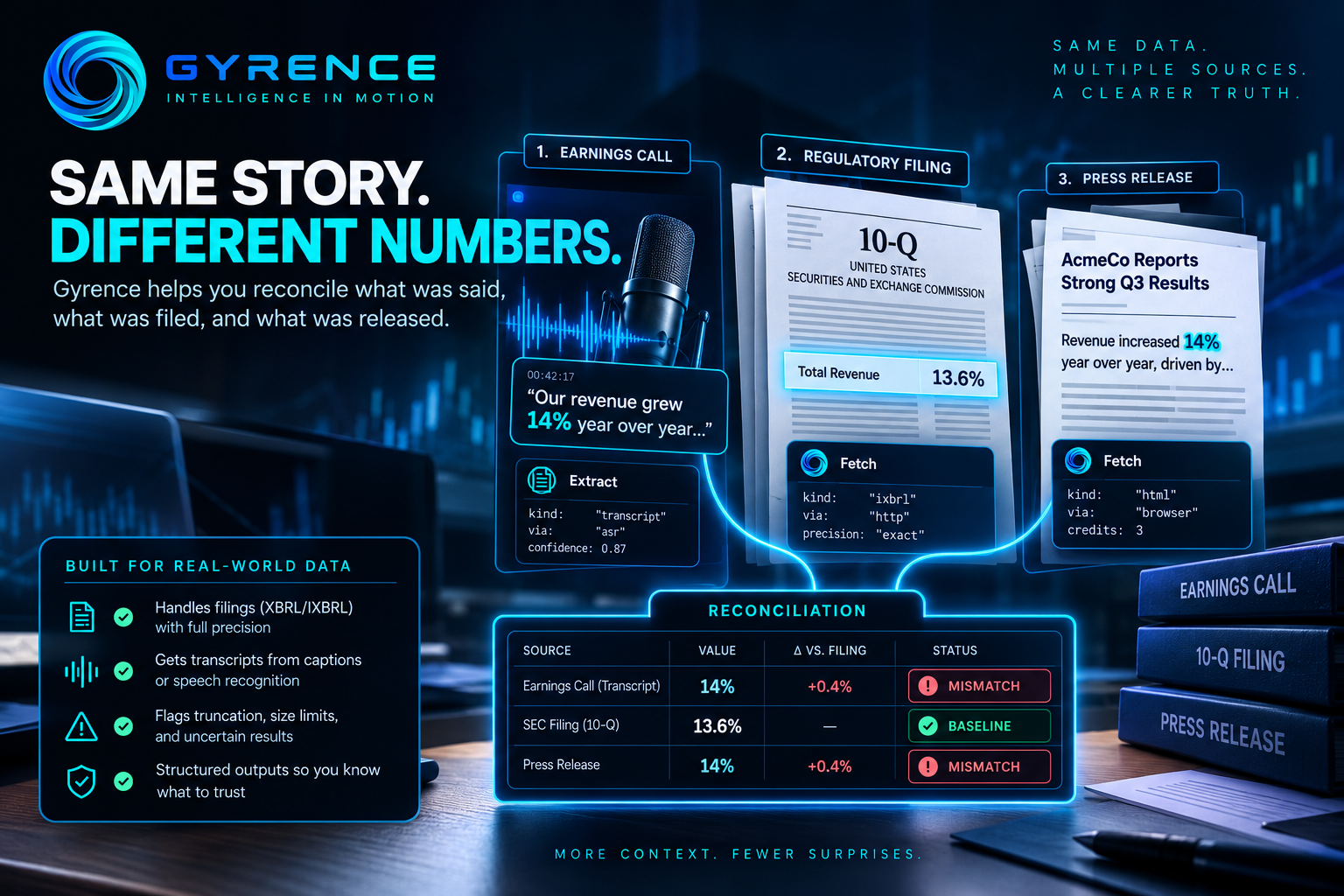
Earnings season produces a quiet kind of error. An analyst, or an agent working for one, reads a company's earnings call and writes down "revenue grew 14%." The filed report says 13.6%. Neither number is wrong in isolation: one was spoken, one was filed. But the moment they land in the same spreadsheet without being compared, someone downstream trusts the wrong one.
Checking a claim across sources sounds like a diffing problem. In practice it fails in earlier, less glamorous places: getting the spoken words out of an audio file, getting the filed figure out of a document without damaging it, and being honest about what you could not read. This post walks through a reconciliation job built from Gyrence's primitives, and what each step does and does not guarantee.
The job
For one company and one quarter, compare three things: the figure management said on the earnings call, the figure in the regulatory filing, and the figure in the press release. Flag any disagreement for a human.
Step 1: Get the filed number without losing digits
Gyrence's Fetch primitive detects what a URL actually is and returns a typed result. For a regulatory filing published with embedded machine-readable tags, the response kind is ixbrl (inline eXtensible Business Reporting Language). Fetch pulls the tagged facts out of the rendered page, so you compare the tagged value instead of scraping a number out of a table cell. Raw eXtensible Business Reporting Language files come back as xbrl, with precision preserved as exact source strings.
That last detail matters for diffing. If a parser quietly turns a long decimal into a floating-point number, your comparison can report a difference that does not exist, or hide one that does. Gyrence takes the same stance with columnar files: Parquet and Arrow values with decimals at or above precision 16 are refused with an approximationRisk flag, rather than rounded without telling you. A flagged cell you can see beats a wrong cell you cannot.
Inline filings have one limit worth knowing: the parser enforces an 8 MB size gate. Over that, the filing is not parsed as structured facts, and the response is decorated with ixbrlAttempted: true and ixbrlError: "oversized-ixbrl". Your job should treat that as "unverified," not "no data."
Step 2: Get the spoken number
Earnings calls are audio or video, which most scraping tools cannot read at all. Gyrence's Extract primitive checks for a transcript first. It can use YouTube caption tracks or a podcast feed's transcript tag; if neither exists, it falls back to speech recognition on the media. The result carries kind: "transcript" and a via value of captions, podcast_rss, or asr (automatic speech recognition), so you always know how the words were produced.
Provenance changes how much you should trust a mismatch. A disagreement between the filing and a human-written caption is a stronger signal than a disagreement between the filing and a machine-transcribed "fourteen" that may have been "forty."
If no transcript can be produced, Extract surfaces a not-found error instead of silently pulling the surrounding web page and answering from that. For an audit, a loud failure is the correct behavior.
Step 3: Ask for structured output, then check it yourself
Extract takes a url, a plain-language prompt, and an optional schema string. A request might look like this:
{
  "url": "https://example.com/q3-earnings-call",
  "prompt": "What year-over-year revenue growth did management state? Quote the sentence.",
  "schema": "{\"revenue_growth_pct\": \"number\", \"quote\": \"string\"}"
}
Two honesty notes from the code. First, the schema is guidance for the model, not a guarantee: the output structure is best-effort and is not validated against it, so validate extractedJson on your side before it enters a comparison. Second, long inputs are cut to the first 12,000 characters before the model sees them. Gyrence tells you when that happened through truncated and originalLengthChars. A full call transcript will usually exceed that limit, so a careful job checks truncated and, when it is true, treats the answer as partial and narrows the source, for example to prepared remarks, rather than trusting a number that may have come from the middle of a conversation.
Asking for the quoted sentence alongside the number gives the human reviewer something to read at a glance.
Step 4: Compare, and keep the verdicts honest
Now the diff is the easy part, and it is yours to write. Because every input carries a kind, a via, and any truncation or precision flag, you can classify each pair of values as:
- Match: same value from sources you trust.
- Mismatch: different values, both read cleanly. Send it to a person with both quotes.
- Unverified: one side was truncated, oversized, or flagged. Say so; do not guess.
That third bucket is the point. An audit that only reports matches and mismatches is quietly claiming it read everything.
What it costs
Per the published schedule, a Fetch call costs 1 credit over plain HTTP or 3 when the headless browser is needed, and an Extract call costs 5 credits, or 7 with the browser. A three-source check for one company is therefore a small, predictable number of credits.
Where to start
Pick one company and one quarter you already know the answer for. Fetch the filing, Extract from the call, and see whether the pipeline's verdicts agree with your own reading. Pay particular attention to the Unverified cases: they show you where your current process is guessing. The API reference is at gyrence.com/docs.